Kubernetes Controllers: Why Your Cluster Feels Like Magic (It's Not)
A journey through control loops, watch streams, and custom resources—discovering how Kubernetes actually stays in sync with itself, and why controllers are the real MVPs of the platform.
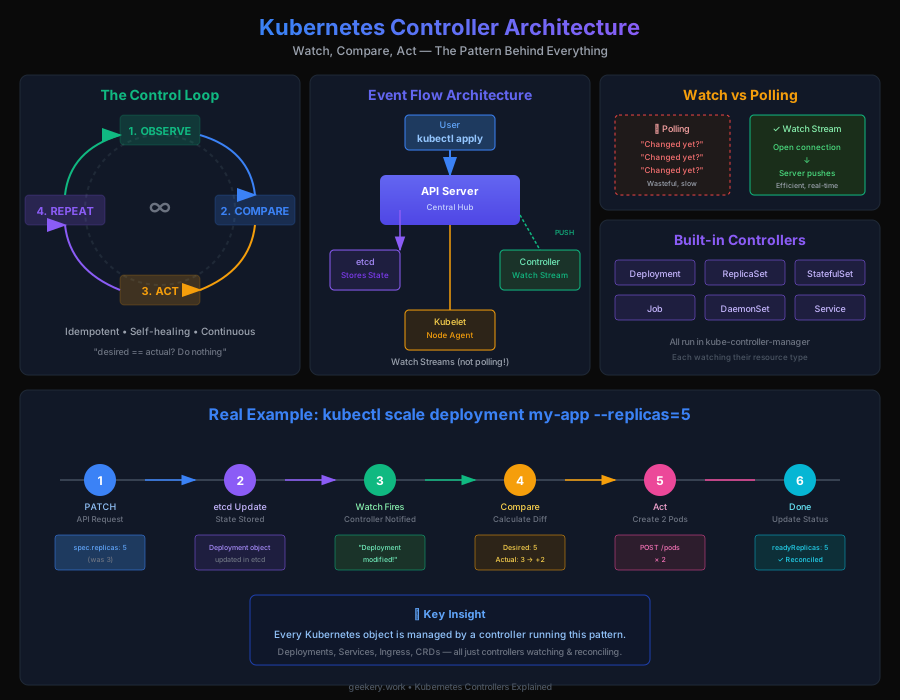
Kubernetes Controllers: Why Your Cluster Feels Like Magic (It's Not)
The first time I deployed something to Kubernetes, I was genuinely confused. I wrote a YAML file saying "I want 3 replicas," and Kubernetes... just kept running 3 replicas. Forever. Even when one crashed. Without me doing anything.
I thought it was magic.
Turns out, it's just controllers. And once you understand what controllers actually do, you realize Kubernetes isn't magic—it's just really good engineering.
What Controllers Actually Are
Controllers are the reason Kubernetes feels self-healing and declarative. Here's the core concept: they continuously watch your cluster, compare reality to what you declared, and automatically fix any drift.
That's it. That's the whole thing. Everything that feels "magical" about Kubernetes traces back to this simple pattern.
At their heart, controllers implement this endless cycle:
- Observe – Look at the current state of resources
- Compare – Check it against your declared desired state
- Act – Fix anything that doesn't match
- Repeat – Go back to step 1
It's genuinely elegant. And crucially, this loop is idempotent, meaning if a controller crashes and restarts, it won't create duplicate resources or corrupt anything. It'll just start watching again and fix whatever's wrong. That resilience is built in.
The Cast of Characters (Cluster Components)
Before controllers can do their thing, you need the infrastructure that makes coordination possible:
The API Server – The central nervous system. Everything goes through here. Clients update state through it, events get stored via it, and controllers watch through it.
etcd – The source of truth. Distributed key-value store that persists everything. If etcd goes down, your cluster's memory is gone. That's why you back it up religiously.
Kubelet – Runs on every node. Manages pods locally and constantly reports back "here's what's actually running on my node."
Scheduler – Watches for unscheduled pods and assigns them to nodes based on resource requests. The matchmaker of the cluster.
Controller Manager – The conductor. Runs all the built-in controllers (ReplicaSet, Deployment, StatefulSet, Job, etc.) in one process. This is where most of the magic happens.
kube-proxy – Network glue. Handles service routing and iptables magic so your pods can talk to each other.
Cloud Controller Manager – The bridge to your cloud provider (AWS, GCP, Azure). Handles cloud-specific stuff like load balancers and persistent volumes.
All of these are constantly watching, comparing, and acting. They're a coordinated orchestra, and controllers are how they stay in sync.
How Events Actually Flow Through Your Cluster
This is where things get interesting (and where I spent way too long confused). Controllers don't just repeatedly poll "hey, did anything change?" That would be terrible.
Instead, there's an event-driven system. Let me walk you through it:
Step 1: Something Happens, An Event Gets Created
Let's say a pod crashes. The kubelet on that node notices the container exited. It POSTs an event to the API server:
Event: "Pod unhealthy, exit code 1"
Reason: "BackOff"
Timestamp: now
Scheduler assigns a pod? Event. Image pull takes a long time? Event. Service gets created? Event.
Step 2: API Server Stores the Event
The API server doesn't just broadcast and forget. It stores this event in etcd as a first-class resource. You can actually query events:
kubectl get events
kubectl get events -n kube-system
kubectl describe pod my-pod  # Shows related events at the bottom
Events aren't second-class citizens—they're trackable, queryable resources.
Step 3: Controllers Use Watch Streams (Not Polling!)
Here's the key insight: instead of controllers repeatedly asking "did anything change?" (polling), they open watch streams—persistent, real-time connections to the API server.
It's like the difference between:
- Bad approach: Calling your friend every 5 seconds asking "did anything happen?" (polling)
- Good approach: Your friend texts you the moment something interesting happens (push/watch streams)
Watch streams are push-based. The API server pushes notifications to watching controllers in real-time. This is way more efficient and why Kubernetes can handle large clusters without everything going insane.
Step 4: Controllers Filter and Act
When a controller gets a notification via its watch stream, it doesn't blindly react. It filters:
- "Is this resource something I care about?"
- "Is it in a namespace I manage?"
- "What type of event is this?"
Only then does it start its reconciliation loop.
Step 5: Controllers Emit Their Own Events
As controllers take actions, they emit events of their own. The ReplicaSet controller might emit "scaling up to 3 replicas." These events flow back through the system, potentially triggering other controllers.
It's a chain reaction of coordination, all held together by events and watch streams.
Reconciliation: The Core Loop in Action
Here's where a controller actually does something. When it gets a notification, reconciliation happens:
1. Fetch the resource from the API server
   "Get me the current Deployment"

2. Compare desired vs actual
   "Spec says 3 replicas, but only 2 are running"

3. Determine what needs to happen
   "I need to create 1 more pod"

4. Execute the necessary changes
   POST new pod to API server

5. Update the resource's status
   "Updated 2 seconds ago, status: progressing"

6. Decide: retry now or wait?
   "Check again in 30 seconds"
All of this happens automatically, continuously, and silently. You declare what you want, and controllers make it happen. Then they keep making sure it stays that way.
Custom Resources: Extending Kubernetes with Your Own Controllers
This is where Kubernetes transforms from a container orchestrator into a platform for building platforms.
The Pattern
When you install something like ArgoCD or sealed-secrets, here's what actually happens:
Step 1: The Custom Resource Definition (CRD) Gets Installed
ArgoCD defines a CRD:
apiVersion: apiextensions.k8s.io/v1
kind: CustomResourceDefinition
metadata:
  name: applications.argoproj.io
spec:
  names:
    kind: Application
    plural: applications
  scope: Namespaced
  validation:
    openAPIV3Schema: [...]
This tells Kubernetes: "Hey, now you understand Application resources. They have these fields, these validation rules, etc."
Step 2: The Controller Pod Gets Deployed
ArgoCD's controller runs as a normal pod in the cluster (usually argocd-application-controller). It's just a container, nothing special, but it has one job.
Step 3: The Controller Starts Watching
The controller opens a watch stream:
"API Server, tell me about Application resources"
Step 4: User Creates an Application
You write an Application YAML and apply it:
apiVersion: argoproj.io/v1alpha1
kind: Application
metadata:
  name: my-app
spec:
  source:
    repoURL: https://github.com/...
    path: apps/my-app
  destination:
    server: https://kubernetes.default.svc
Step 5: API Server Notifies the Controller
Via the watch stream, the API server tells the controller: "New Application created!"
Step 6: Controller Takes Action
The ArgoCD controller reads your Application:
- Checks out the git repo
- Compares what's in git to what's in the cluster
- Syncs them if they differ
- Updates the Application's status
Step 7: Magic Happens
From a user's perspective, you created an Application resource and your app got deployed. You don't know or care that there's a controller doing the heavy lifting. That's the point.
The Complete Picture: How Everything Connects
Let me map out the entire flow so it clicks:
┌─────────────────────────────────────────────────────────────┐
│                      Your Declaration                       │
│                (kubectl apply -f deploy.yaml)                │
└────────────────────────┬────────────────────────────────────┘
                         │
                         ▼
              ┌──────────────────────┐
              │    API Server        │
              │  (central hub)       │
              └──────────────────────┘
                    ▲              ▲
                    │              │
         ┌──watch   │              │   stores──┐
         │          │              │           │
         │          ▼              ▼           ▼
      Controller   etcd      Component Events
         (runs your         (kubelet, scheduler,
          logic)             cloud provider, etc.)
         │
         │ creates/updates/deletes
         │
         ▼
    Your Infrastructure
    (pods, services, volumes)
Each component is independent—kubelet doesn't know about ArgoCD, ArgoCD doesn't know about the scheduler. They coordinate entirely through events and the API server. That loose coupling is powerful. It's how you can bolt on new controllers without breaking anything.
Why This Design Actually Matters
I get why this seems like overkill when you first see it. But this architecture buys you some incredible properties:
Declarative, not imperative – You declare what you want, not how to get there. Controllers handle the "how."
Self-healing – Controllers continuously repair drift. Pod dies? New one appears. Node goes down? Pods reschedule.
Extensible – Want to add new behavior? Write a controller. Kubernetes doesn't need to know about it.
Observable – Events are trackable. You can debug why something happened by looking at event history.
Idempotent – Run the same operation a thousand times, get the same result. No surprises.
Deep Dive: A Real Example
Let me trace through what actually happens when you scale a Deployment:
kubectl scale deployment my-app --replicas=51. kubectl sends API request
PATCH /deployments/my-app
{"spec": {"replicas": 5}}
2. API Server updates etcd
The deployment object is updated. Old value: replicas: 3, new value: replicas: 5
3. Deployment Controller Gets Notified The controller's watch stream fires:
Event: Deployment "my-app" was modified
4. Deployment Controller Fetches the Deployment
It reads the updated object from the API server. Sees: spec.replicas: 5
5. Controller Counts Existing Pods It queries the API server:
kubectl get pods -l app=my-app
Result: 3 pods exist
6. Controller Calculates Diff
Desired: 5 replicas
Actual: 3 pods
Difference: +2 pods needed
7. Controller Creates New Pods POSTs 2 new pod definitions to the API server. The scheduler watches, sees unscheduled pods, assigns them to nodes. Kubelet on those nodes notices new pods, pulls images, starts containers.
8. Controller Updates Status
status:
  replicas: 5
  readyReplicas: 3        # 3 are ready, 2 still starting
  updatedReplicas: 5
9. Repeat The controller keeps watching. In a few seconds:
- Containers finish starting
- Readiness checks pass
readyReplicasbecomes 5- Everything's done
All of this happens because:
- The controller watched a resource
- Noticed a change
- Compared desired vs actual
- Took corrective action
Quick Command Reference
# See what controllers are running
kubectl get deployment -n kube-system
# Look for: coredns, etcd (if local), kube-controller-manager, kube-scheduler

# Watch your cluster heal itself in real-time
kubectl get pods --watch

# See events for a resource
kubectl describe deployment my-app
# Events section shows the history

# Query all events in a namespace
kubectl get events -n default

# See a controller's logs (if you want to debug)
kubectl logs -n kube-system deployment/kube-controller-manager -f

# Install a custom controller (example: ArgoCD)
helm repo add argocd https://argoproj.github.io/argo-helm
helm install argocd argocd/argo-cd
# Now check the new CRD
kubectl get crd | grep argoproj
The Aha Moment
Controllers make Kubernetes work through one elegant pattern: watch, compare, act. Repeat forever. No complexity beyond that, really—just applied consistently across the entire system.
The reason Kubernetes feels magical isn't because it's doing anything impossible. It's because this simple pattern, applied relentlessly, gives you:
- Reliability through automatic repair
- Scalability through efficient event-driven architecture
- Extensibility through custom resources and controllers
- Predictability through idempotent operations
You declared your desired state once, and a bunch of independent controllers work together to maintain it. That's genuinely clever engineering.
The next time you see a pod get recreated or a service route appear, you'll know it's not magic—it's a controller doing its job. And honestly, once you see it, you can never unsee it.
Still confused about something? Controllers usually click better when you see them in action. Try deploying something and watching the events with kubectl describe pod <pod-name>. See how events cascade? That's controllers talking to each other.