Building a RAG-Powered Terminal: Teaching My Portfolio to Answer Questions About Itself
How I added semantic code search to my portfolio using pgvector, OpenAI embeddings, and a healthy dose of trial and error
I have a confession: I got tired of explaining how my portfolio works.
Not because I don't love talking about it (ask any of my friends—they'll tell you I bring it up way too often), but because the same questions kept coming up. "How does the terminal work?" "What's the tech stack behind the radar?" "Can I see the code for the pixel canvas?"
So naturally, instead of just... you know, adding a documentation page like a normal person, I decided to build a RAG (Retrieval Augmented Generation) system that lets users ask my portfolio questions about itself. Because why solve a problem simply when you can over-engineer it? (I can already hear my pragmatic engineer friends sighing.)
The Itch I Needed to Scratch
Here's the thing: my portfolio has this retro terminal interface that lets visitors navigate around, play games, and interact with various features. It already had some basic command recognition ("show me the blog", "play snake"), but I wanted it to be smarter. I wanted people to be able to ask "how does the fuzzy terminal work?" and get an actual, intelligent answer with code references.
Traditional documentation has a problem—it goes stale. You write it once, then the code changes, and suddenly your docs are lying to users (and yourself). With RAG, the terminal could search the actual codebase and answer questions based on the current implementation. Dynamic documentation that updates itself? Sign me up.
Plus, I'd been curious about vector databases and semantic search for a while. This felt like the perfect excuse to dive in.
The Stack I Landed On
After researching RAG implementations (and getting lost in a rabbit hole of Pinecone vs. Weaviate vs. Qdrant comparisons), here's what I chose:
| Component | What I Used | Why |
|---|---|---|
| Vector DB | PostgreSQL + pgvector | Already running Postgres in my homelab, free, handles my small codebase easily |
| Embeddings | OpenAI text-embedding-3-small | 1536 dimensions, reliable for code, cheap |
| LLM | Gemini 3 Flash | Fast responses, good reasoning, handles technical queries well |
| Framework | Next.js 15 Server Actions | Already my stack, streaming responses work great |
| Code Parsing | TypeScript Compiler API | AST-based chunking preserves semantic boundaries |
Why pgvector instead of a hosted solution? Simple: my codebase is small (206 TypeScript files), I already run PostgreSQL in my homelab for other projects, and I'm cheap. Why pay for Pinecone when pgvector can handle 717 embeddings without breaking a sweat? Plus, I like owning my data.
Why OpenAI embeddings? I tested a few options, and OpenAI's text-embedding-3-small consistently gave the best results for code. The 1536-dimensional embeddings are detailed enough to capture semantic meaning in TypeScript/React code, and at $0.02 per million tokens, it's practically free for my use case.
The Architecture (Or: How I Connected All The Pieces)
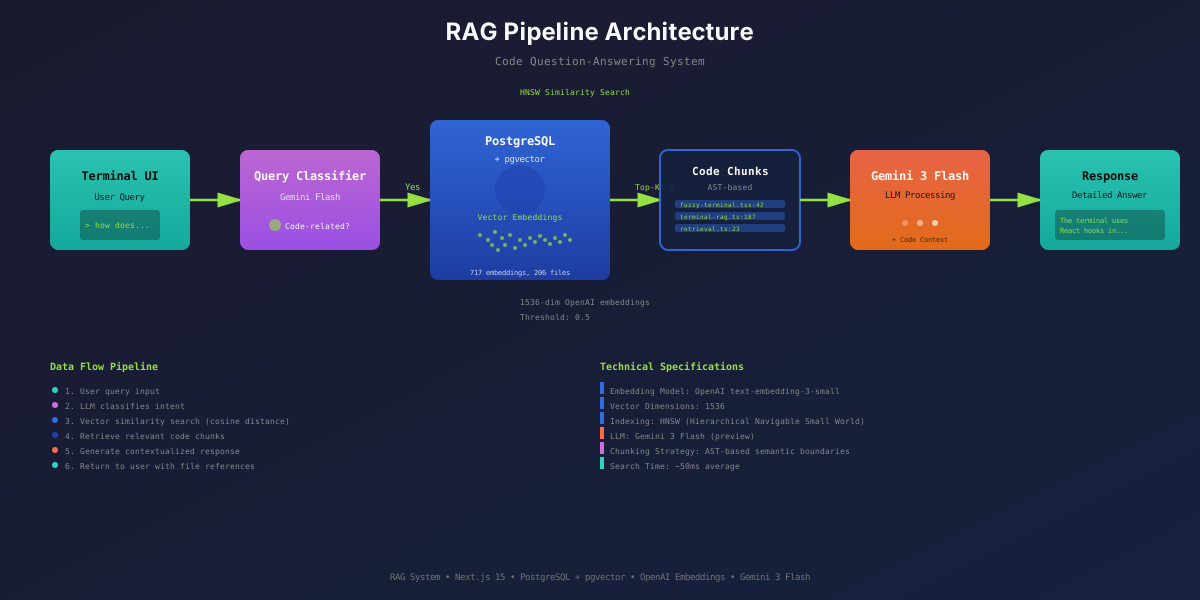
The system has three main layers, and honestly, each one taught me something I wish I'd known upfront.
The complete data flow: from user query through classification, vector search, code retrieval, and LLM processing to generate detailed responses.
Layer 1: Database Layer (The Foundation I Almost Messed Up)
PostgreSQL with the pgvector extension. Sounds simple, right? It mostly was, except I initially forgot to create the extension and spent 20 minutes wondering why my vector operations were failing. (Pro tip: CREATE EXTENSION IF NOT EXISTS vector; goes at the very top of your schema initialization.)
// src/lib/db/vector.ts
export async function initializeSchema(): Promise<void> {
  await query(`CREATE EXTENSION IF NOT EXISTS vector;`);

  await query(`
    CREATE TABLE IF NOT EXISTS code_embeddings (
      id SERIAL PRIMARY KEY,
      file_path TEXT NOT NULL,
      chunk_index INTEGER NOT NULL,
      chunk_type TEXT,
      content TEXT NOT NULL,
      embedding vector(1536),
      metadata JSONB DEFAULT '{}',
      content_hash TEXT NOT NULL,
      created_at TIMESTAMP DEFAULT NOW(),
      UNIQUE(file_path, chunk_index)
    );
  `);

  // HNSW index for fast similarity search
  await query(`
    CREATE INDEX IF NOT EXISTS code_embeddings_embedding_idx
    ON code_embeddings
    USING hnsw (embedding vector_cosine_ops);
  `);
}
The HNSW (Hierarchical Navigable Small World) index is where the magic happens. It makes vector similarity searches stupidly fast—think O(log n) instead of O(n). For my 717 embeddings, searches complete in under 50ms.
The content_hash column was a late addition after I realized I needed incremental ingestion. More on that disaster later.
Layer 2: RAG Layer (Where Things Got Interesting)
This is where I spent most of my time. Four key components:
1. Code Chunking (AST-Based, Not Naive)
My first attempt at chunking? Split files every 100 lines. Terrible idea. It would slice functions in half, separate imports from the code that uses them, and generally create nonsense chunks.
So I switched to AST (Abstract Syntax Tree) parsing using the TypeScript Compiler API:
// src/lib/rag/chunker.ts
export function extractChunks(filePath: string, sourceCode: string): CodeChunk[] {
  const sourceFile = ts.createSourceFile(
    filePath,
    sourceCode,
    ts.ScriptTarget.Latest,
    true
  );

  const imports = extractImports(sourceFile);
  const chunks: CodeChunk[] = [];

  ts.forEachChild(sourceFile, (node) => {
    if (ts.isFunctionDeclaration(node) || ts.isClassDeclaration(node)) {
      // Extract complete function/class with imports
      chunks.push({
        type: ts.isFunctionDeclaration(node) ? 'function' : 'class',
        content: `${imports}\n\n${node.getText()}`,
        metadata: {
          name: node.name?.getText(),
          lineStart: sourceFile.getLineAndCharacterOfPosition(node.pos).line + 1
        }
      });
    }
  });

  return chunks;
}
This preserves semantic boundaries. Each chunk is a complete, understandable unit of code. React components get detected via JSX patterns (return <...> or <ComponentName>), and I include the imports so the code makes sense in isolation.
2. Embedding Generation (Batch It or Regret It)
Generating 717 embeddings one at a time would have taken forever. I implemented batching:
// src/lib/rag/embeddings.ts
export async function generateEmbeddingsBatch(
  texts: string[],
  batchSize = 50
): Promise<number[][]> {
  const results: number[][] = [];

  for (let i = 0; i < texts.length; i += batchSize) {
    const batch = texts.slice(i, i + batchSize);
    const response = await openai.embeddings.create({
      model: 'text-embedding-3-small',
      input: batch,
      encoding_format: 'float',
    });
    results.push(...response.data.map(d => d.embedding));
  }

  return results;
}
This cut ingestion time from ~10 minutes to ~90 seconds. Batching matters.
3. Vector Similarity Search (The Threshold That Broke Me)
Here's where I learned my most painful lesson. My initial similarity threshold was 0.7 (70%). Seemed reasonable, right? Industry standard and all that?
Wrong. Dead wrong. For code.
// src/lib/db/vector.ts
export async function searchSimilar(
  queryEmbedding: number[],
  limit = 5,
  similarityThreshold = 0.7  // <-- THIS WAS THE PROBLEM
): Promise<SimilaritySearchResult[]> {
  const result = await query<SimilaritySearchResult>(`
    SELECT
      id, file_path, chunk_type, content, metadata,
      1 - (embedding <=> $1::vector) as similarity
    FROM code_embeddings
    WHERE 1 - (embedding <=> $1::vector) > $2
    ORDER BY embedding <=> $1::vector
    LIMIT $3
  `, [`[${queryEmbedding.join(',')}]`, similarityThreshold, limit]);

  return result.rows;
}
With a 0.7 threshold, I got ZERO results for queries like "how does the terminal work". Turns out, code embeddings are different from text embeddings. A 0.5 similarity (50%) for code chunks is actually quite relevant—it means the code deals with similar concepts, uses similar patterns, or works with related systems.
After testing thresholds from 0.4 to 0.8, I settled on 0.5. Suddenly, the system started finding great matches:
- Query: "fuzzy terminal" -> src/components/ui/fuzzy-terminal.tsx (51.6%)
- Query: "radar tracking" -> src/components/radar/radar-tracker.tsx (57.7%)
- Query: "kubernetes simulator" -> K8s learning components (58.2%)
4. Query Classification (Because Not Everything Needs RAG)
If someone types "go to blog", I don't need to search the codebase—it's a navigation command. I added a quick LLM call to classify queries:
// src/lib/rag/query-classifier.ts
export async function classifyQuery(query: string): Promise<QueryClassification> {
  const { object } = await generateObject({
    model: google('gemini-3-flash-preview'),
    schema: z.object({
      isCodeRelated: z.boolean(),
      requiresPageContext: z.boolean(),
      confidence: z.enum(['high', 'medium', 'low'])
    }),
    prompt: `Classify this query: "${query}"`
  });

  return object;
}
This saved tons of unnecessary vector searches and made responses faster.
Layer 3: Terminal Integration (Making It All User-Facing)
The terminal uses a Next.js Server Action that ties everything together:
// src/app/actions/terminal-rag.ts
export async function processTerminalCommand(
  input: string,
  history: ChatMessage[],
  pageContext?: PageContext
): Promise<CommandResult> {
  // 1. Classify the query
  const classification = await classifyQuery(input);

  // 2. If code-related, retrieve context
  let codeContext = '';
  if (classification.isCodeRelated) {
    const chunks = await retrieveCodeContext(input, 5, 0.5);
    codeContext = formatCodeForLLM(chunks);
  }

  // 3. Build enriched context
  const enrichedContext = [
    pageContext ? `Current Page: ${pageContext.title}` : '',
    codeContext
  ].filter(Boolean).join('\n\n');

  // 4. Generate response with Gemini
  const { object } = await generateObject({
    model: google('gemini-3-flash-preview'),
    schema: commandSchema,
    system: buildSystemPrompt(enrichedContext),
    messages: [...history, { role: 'user', content: input }]
  });

  return object;
}
The three-tier context system:
- Page Context - Where the user is (blog post, game page, etc.)
- RAG Context - Relevant code chunks from vector search
- Chat History - Conversation continuity
What Went Wrong (A.K.a. My Learning Opportunities)
Let me walk you through the mistakes I made so you don't have to.
Mistake #1: The 0.7 Threshold Disaster
I already ranted about this, but it bears repeating: don't blindly copy similarity thresholds from tutorials. Text embeddings and code embeddings behave differently. Test your thresholds empirically.
I wasted two hours debugging why my "perfectly good" vector search returned nothing. The fix? One number. Change 0.7 to 0.5. That's it.
Mistake #2: Gemini Model Naming
When I tried to use Gemini 3 Flash, I confidently wrote:
const model = google('gemini-3-flash');Got back: models/gemini-3-flash is not found for API version v1beta
Turns out, preview models need the -preview suffix:
const model = google('gemini-3-flash-preview'); // <-- This worksThe error message was clear, but I spent 15 minutes trying different variations before reading the actual documentation. (Yes, I'm that developer. We all are sometimes.)
Mistake #3: Response Quality
My initial responses were pathetically short. Like, "The terminal uses React hooks" level of useless.
The problem? My prompt said:
"Be concise. Keep responses under 300 characters."
I fixed it by rewriting the prompt to say:
"For code implementation questions WITH context: Be DETAILED and thorough. Reference specific files and line numbers. Walk through the implementation step-by-step."
Suddenly, responses included file paths, explained architecture decisions, and connected multiple code pieces together. The lesson? Your prompt directly controls output quality. Don't be stingy with tokens when you're providing code context.
Mistake #4: Large File Handling
One file (src/lib/osi-simulator/types.ts) exceeded OpenAI's 8192 token embedding limit. It's a giant TypeScript type definition file (9278 tokens).
Current status: I just skip it during ingestion. Future fix: split large files into multiple chunks before embedding. But honestly? It's a type definition file. Users probably won't ask about it.
Mistake #5: No Incremental Ingestion (Initially)
My first version re-embedded the ENTIRE codebase every time. Even when I changed one line in one file. This was stupid.
I added content_hash (SHA-256 of file contents) to detect changes:
// scripts/ingest-codebase.ts
const contentHash = createHash('sha256').update(sourceCode).digest('hex');
const hasExisting = await hasEmbeddingsWithHash(filePath, contentHash);

if (hasExisting) {
  console.log(`⏭️  Skipping ${filePath} (unchanged)`);
  continue;
}
Now ingestion only processes changed files. Much better.
The Results (It Actually Works!)
After all this, I have a terminal that can answer questions like:
Query: "how does the fuzzy terminal work?"
Response: "The fuzzy terminal (src/components/ui/fuzzy-terminal.tsx) uses React hooks for state management. It maintains command history, handles input through a form submission, and processes commands via a server action (processTerminalCommand). The component uses Tailwind for styling and includes features like command history navigation (↑/↓ arrows), auto-scrolling, and theme support..."
It includes file references! Line numbers! Architecture explanations!
Stats:
- 717 embeddings from 206 TypeScript files
- Average search time: under 50ms
- Similarity threshold: 0.5
- Top-K results: 5 chunks per query
- Total ingestion time: ~90 seconds (with batching)
Lessons I'll Carry Forward
-
Thresholds are domain-specific - Code embeddings need lower thresholds than text. Test empirically.
-
AST parsing > naive splitting - Preserving semantic boundaries makes chunks actually useful.
-
Batch everything - Generating embeddings one-by-one is a waste of time and money.
-
Prompt engineering matters - Your LLM is only as good as your instructions. Be specific about output length and detail level.
-
Start simple, add complexity - I could have started with Pinecone and a hosted solution. But pgvector in my existing Postgres instance worked great and cost nothing.
-
Hash-based change detection is free - SHA-256 hashing is cheap, and it saves SO much time on re-ingestion.
-
Read the actual docs - That
-previewsuffix took me 15 minutes to discover. The docs had it on page 1.
What's Next?
I'm pretty happy with how this turned out, but there's room for improvement:
- Better chunking for large files - Split files >8192 tokens automatically
- Hybrid search - Combine vector search with keyword search for better precision
- Usage analytics - Track which queries work well and which don't
- Feedback loop - Let users vote on answer quality to tune the system
- Multi-modal support - Maybe handle diagrams and images from the codebase?
But for now? It works. My portfolio can explain itself. Visitors can ask technical questions and get intelligent, code-backed answers.
And I got to play with vector databases, AST parsing, and LLM prompting. Worth it.
If you're building something similar, I'd love to hear about it. What vector database did you choose? How did you handle chunking? Did you also waste hours on similarity thresholds, or was that just me?
Feel free to poke around the live terminal and ask it questions. If it gives you a terrible answer, well... that's probably my prompt engineering, not the RAG system. (But also maybe the RAG system. I'm still learning!)